

Update as of 8/20/26
Following the scheduled update some members are reporting the mobile app is unresponsive. It seems to be happening more with iOS (iPhone) users. Members have had success reinstalling the app from the App Store.
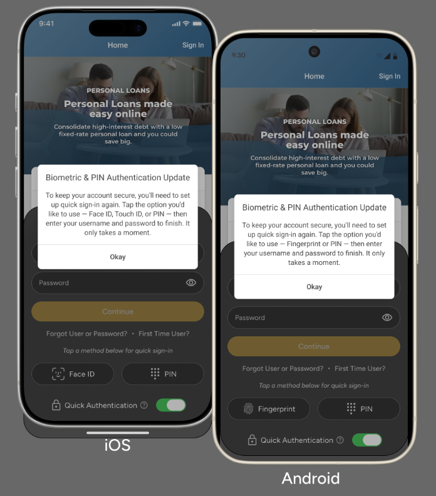
Please be aware that you need to sign in using your username and password first before setting up the quick sign-in biometric options (like Face, PIN or fingerprint) again.
Please note that during this process you may be asked to update to a more complex password going from a minimum of 8 characters to 10.
Orginal post:
In August, you’ll notice a few updates to your Sentinel Federal Credit Union mobile banking app. These enhancements are designed to improve security and your overall login experience.
What to expect
August 3–14
- Your mobile banking app will update automatically through your device’s app store.
- You’ll see a refreshed login screen the first time you open the updated app.
- You will need to select your preferred login method the first time you open the app after the upgrade, but each time thereafter, the preferred login method will be presented automatically. Please note, biometric login methods Voice for iOS (iPhone) and Android, and Face for unsupported Android devices, will be sunset.
August 18
- For security, you’ll be asked to:
- Re-enroll your biometric login preference
- Then enter your username and password to finish
Please note that during this process you may be asked to update to a more complex password going from a minimum of 8 characters to 10.
This is a one-time process and only takes a few moments to complete.
No action is needed until you receive the prompts in the app.
If you have questions or need assistance, our team is happy to help. Thank you for your patience as we continue to improve your digital banking experience.